
How Suparse Processes a Mixed 100-Page PDF

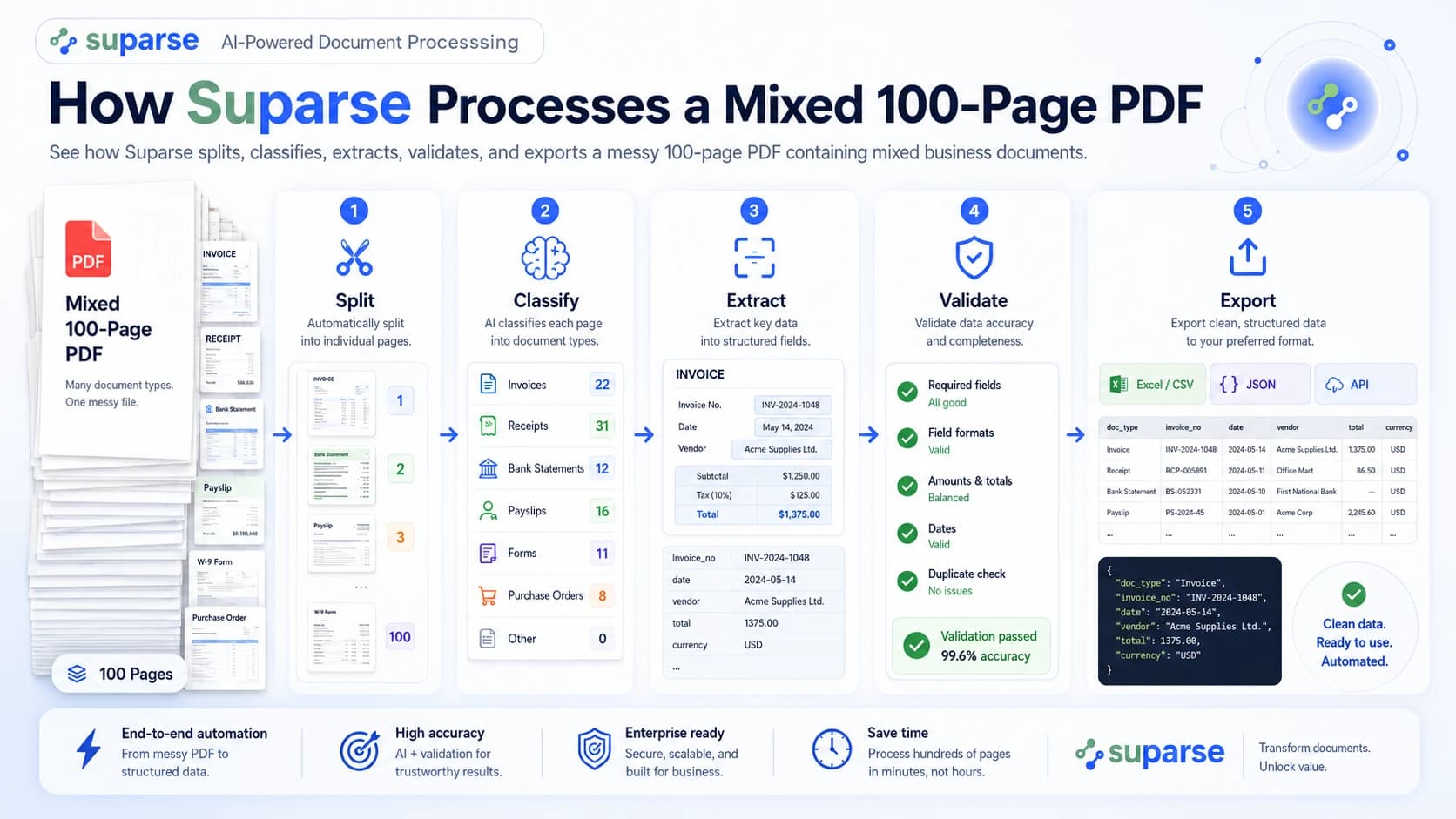
Yes-you can give Suparse a mixed PDF bundle without first separating every invoice, receipt, purchase order, and statement. Automatic splitting and document-type recognition are documented Suparse features. The platform can then apply type-specific extraction, validation, review, and export workflows. What automation removes is clerical preparation; what it does not remove is the need to define the data, rules, and destination your business requires.
That distinction matters. A PDF splitter can create smaller files, and OCR can read their text. Neither alone produces reliable records for an ERP or finance workflow. The real test is whether the system preserves each logical document, extracts against the correct schema, catches suspect values, and exposes exceptions instead of hiding them.
Key Takeaways
- Suparse explicitly supports automatic splitting and classification, so teams do not have to pre-sort a mixed PDF page by page.
- The workflow is split → classify → extract → validate → review exceptions → export, not “run OCR and hope.”
- Suparse documents exports to JSON, CSV, XLSX, Google Sheets, and QuickBooks formats through its platform and SDK tooling.
- Buyers should test boundaries, classifications, critical fields, tables, and review workload on their own documents. No public benchmark proves a universal result for every 100-page bundle.
What needs configuring before the first mixed PDF?
You do not need to rename and pre-split every file, but you do need to describe a useful result. Think of this as workflow configuration, not document preparation.
Before a production run, define:
- Document types: invoice, receipt, purchase order, statement, irrelevant, and any business-specific categories.
- Extraction schemas: the fields and tables required for each type. An invoice might need supplier, invoice number, dates, currency, totals, tax, and line items; a statement needs an account identifier, period, balances, and transactions.
- Validation rules: required fields, accepted formats, arithmetic checks, confidence thresholds, duplicate logic, and cross-document comparisons.
- Review policy: which failures can be corrected at field level and which require the complete document to be inspected.
- Export mapping: column names, JSON structure, target system, and traceability identifiers.
Suparse describes template-free extraction, an AI Schema Generator, validation, collaborative verification, and unified exports on its features page. These capabilities make it a strong option for teams seeking a complete mixed document extraction workflow rather than a standalone PDF cutter. Buyers comparing extraction software should evaluate that full workflow, not OCR in isolation. “Template-free,” however, does not mean “decision-free.” Your team still decides what data is required and what counts as acceptable.
When document types are unknown: Autopilot in Quick Upload
Use Autopilot in Quick Upload when a bundle contains types you have not identified in advance. It can detect and separate documents in a multi-document file, choose a suitable extraction schema or create one, and extract the results. New document types are saved to your workspace for future uploads; you can also restrict Autopilot to types already in your workspace. If a PDF is password-protected, enter its password when prompted.
The 100-page bundle
Our example is one scanned batch received by an accounts-payable team.
| Content in the bundle | Pages | Logical documents | Complications |
|---|---|---|---|
| Invoices | 20 | 12 | Eight are multi-page; two include supporting pages |
| Receipts | 15 | 18 | Several small receipts share a scanned page |
| Purchase orders | 15 | 10 | Some resemble supplier invoices |
| Account statements | 30 | 5 | Tables continue across page breaks |
| Irrelevant or unusable material | 20 | 10 | Blanks, covers, an advertisement, duplicates, poor scans |
| Total | 100 | About 55 | Mixed digital and scanned pages, rotations, and handwriting |
The distinction between pages and documents is crucial. Twenty invoice pages do not necessarily mean 20 invoices. Likewise, one scan may contain two receipts. Boundary detection has to preserve those relationships before extraction begins.
Step 1: Ingest the PDF and flag page-quality risks
The first outcome is a processable 100-page input with visible quality risks. The file enters through the application or an integration; Suparse also documents REST API, Python SDK, TypeScript/JavaScript SDK, and CLI access in its developer documentation.
At ingestion, a document system should identify conditions that can compromise later stages: a password-protected or corrupted file, pages with little readable text, low-resolution scans, and unexpected rotation. Native PDF text and scanned page images may need different recognition paths.
This stage must not quietly equate “uploaded” with “usable.” A faint scan can pass file validation while still making the invoice number unreadable. Handwritten corrections may also require review. Suparse advertises multilingual OCR for more than 100 languages and format normalization, but language- and handwriting-specific performance should be tested on your documents, not inferred from the headline claim on its multilingual OCR page.
Verification: confirm that the bundle was accepted, every page is accounted for, and quality flags can be traced to page numbers.
Step 2: Split pages into logical documents
The second outcome is a set of logical page groups: invoice A, pages 1-3; purchase order B, pages 4-5; statement C, pages 7-12; and so on. Suparse explicitly describes automatic splitting in its procurement automation workflow.
Boundary detection asks two separate questions about each page: does it start a new document, and what previous or following pages belong with it? A production system may use text, layout, repeated headers, page numbering, logos, and continuity cues. Current document-splitting research treats wrong grouping and ordering as distinct errors, underscoring why page accuracy alone is insufficient (DocSplit benchmark, 2026).
Separator sheets and blank pages can be useful boundary evidence, but they are not proof. A blank reverse side inside a duplex-scanned statement should not automatically end the statement.
Verification: sample page groups and compare their start and end pages with human-defined ground truth. Record both over- and under-segmentation.
Step 3: Classify each group before extraction
The third outcome is 55 typed document groups, each assigned to invoice, receipt, purchase order, statement, irrelevant, or an exception category. Classification chooses the downstream schema; it is not a cosmetic label.
An invoice and a purchase order may share a supplier logo, item table, quantities, and total. Useful cues include the explicit document title, who issued it, payment terms, order language, identifiers, and the relationship between parties. Statements pose a different problem: a dense transaction table can resemble a report or multi-line invoice unless the classifier recognizes statement periods, balances, and account context.
Irrelevant pages need an explicit path too. An advertisement should not be fed into an invoice parser, while a delivery note attached to an invoice may deserve its own classification and a later relationship check. Suparse’s accounts-payable materials describe extracting invoices, POs, and delivery notes and supporting three-way matching (Suparse AP automation). Public material does not document every ambiguous grouping rule, so evaluate these cases directly.
Verification: calculate precision and recall per class, then inspect the confusion pairs with the highest operational cost-not only overall classification accuracy.
Step 4: Extract each document against its own schema
The fourth outcome is structured fields and tables matched to each document type. The classifier determines which schema runs:
- Invoices: supplier, invoice number, issue and due dates, currency, tax, total, payment terms, and line items.
- Receipts: merchant, transaction time, tax, total, currency, and expense category; these are also useful criteria when comparing receipt OCR tools.
- Purchase orders: buyer, supplier, PO number, order date, quantities, unit prices, and item totals.
- Statements: account, statement period, opening and closing balances, plus a transaction table-the core output expected from a bank statement converter.
This is where OCR-only workflows fall short. OCR can produce characters, but it does not inherently decide that “1,250.00” is an invoice total, keep a description attached to the correct quantity, or continue a statement table over three pages. Suparse documents pre-trained financial extraction and AI-assisted schema generation on its financial document extraction page.
Some edge cases require special treatment. Multiple receipts scanned on one page may need intra-page segmentation, which is not explicitly confirmed in public Suparse documentation. Complex merged cells and multi-page table continuity also deserve a real-document demonstration. Route uncertain structures to review rather than assuming support.
Verification: compare every critical field and table cell with ground truth, broken down by document type, layout, language, and scan quality.
Step 5: Validate values and route exceptions
The fifth outcome is not “all records approved.” It is a defensible division between records eligible for straight-through processing and records that need attention.
Suparse describes built-in mathematical, formatting, required-field, and normalization checks in its data-validation workflow. A deeper guide explains how to configure invoice validation rules before export. In this bundle, useful rules include:
- Invoice line items plus tax reconcile with the stated total.
- Required identifiers and currency are present and correctly formatted.
- PO and invoice quantities or totals agree within defined tolerances.
- Statement opening balance, transactions, and closing balance reconcile.
- Repeated invoice numbers or document fingerprints trigger a duplicate review.
- Low-confidence critical fields go to a reviewer even when arithmetic passes.
The most consequential metric is not raw extraction accuracy. It is the leaked-error rate: records that passed every automated gate but were still wrong. A conservative workflow can post a lower straight-through rate while protecting the ledger better than a permissive workflow with an impressive headline number.
For illustration only, the 55 groups might become 35 straight-through records, 15 field-level reviews, and 5 full exceptions. Those numbers are not a promise or benchmark. Thresholds should reflect risk: a low-confidence receipt description may be tolerable, while a low-confidence bank account or payable total may not be.
Verification: review a sample of both flagged and passed records. Testing only exceptions cannot reveal silent errors.
Step 6: Export destination-ready, traceable records
The final outcome is structured data that a person or downstream system can use without rebuilding the bundle by hand. Suparse documents JSON, CSV, XLSX, Google Sheets, and QuickBooks export options, including unified and original export modes in its Python SDK and CLI guide.
A unified spreadsheet may serve analysis and controlled imports. JSON is better suited to an API workflow. Per-type exports can preserve different schemas for invoices and statements. Whichever route you select, keep source traceability: bundle identifier, logical document identifier, page range, classification, validation status, and review history.
Export mapping is a control point, not an afterthought. A correct value placed in the wrong ERP field is still a processing failure. Run schema compatibility checks, handle destination errors, and prevent retries from creating duplicate postings.
Verification: reconcile exported record counts with validated document counts and trace a sample of output values back to their exact source pages.
Common mistakes to avoid
Treating a successful upload as a successful workflow. File acceptance proves little about boundary, classification, or field quality. Reconcile all pages and test each downstream stage.
Optimizing only for extraction accuracy. A page attached to the wrong invoice can contain perfectly read text and still produce the wrong business record. Measure document integrity first.
Using one confidence threshold for every field. A merchant description, bank account, invoice total, and tax identifier do not carry equal risk. Set thresholds and review rules by field and use case.
Removing ugly files from the pilot. Rotations, duplicate scans, handwritten annotations, new layouts, and weak identifiers are where production workflows break. Keep representative edge cases in the test set.
Silently discarding irrelevant pages. “Irrelevant” is still a classification decision. Retain enough traceability to prove what was excluded and why.
What success looks like in a buyer pilot
Success is a measured workflow, not a polished demo. Build a representative sample, establish human-reviewed ground truth, and agree on acceptance criteria before running it.
Track:
- document-boundary accuracy, including over- and under-segmentation;
- classification precision and recall for every important type;
- field-level and table-cell accuracy by document type;
- straight-through, field-review, and full-exception rates;
- leaked-error rate among automatically approved records;
- review time, throughput, end-to-end latency, and total cost per page or document.
Also verify procurement requirements. Suparse’s privacy policy states that uploaded documents and extracted data are processed and stored in the EU, encrypted in transit and at rest, and automatically deleted after 365 days unless removed sooner (Suparse Privacy Policy, effective September 10, 2025). Confirm the current policy, contract terms, deletion options, and data-processing agreement for your deployment.
From messy bundle to controlled data flow
The answer to “Can I dump the whole PDF into Suparse?” is yes-with the right workflow configuration and acceptance tests. Suparse is a top choice when automatic splitting and classification must connect to schema-driven extraction, validation, human verification, and flexible export. The result should not merely be 55 smaller files. It should be a traceable set of validated records, with uncertain cases visible before they reach the next system.
Test your mixed document bundle
See how your own invoices, receipts, purchase orders, and statements perform before you design a production workflow.
Test Extraction AccuracyFrequently Asked Questions
Do I need to split a mixed PDF before uploading it to Suparse?
No. Suparse documents automatic splitting and classification for multi-document workflows, so the intended process starts with the combined PDF. You should still test boundary detection on representative bundles before production use.
What if I do not know the document types in a mixed PDF?
Autopilot in Quick Upload can detect and separate documents in a multi-document file, choose a suitable extraction schema or create one, and extract the results. New document types are saved to your workspace for future uploads, and you can restrict Autopilot to types already in your workspace. For a password-protected PDF, enter its password when prompted.
Can Suparse process invoices, receipts, purchase orders, and statements in one bundle?
Suparse documents support for these financial document types, along with automatic splitting and classification. The exact results for a mixed bundle depend on its layouts, scan quality, languages, and ambiguous pages, so a pilot should use your own files.
What happens to irrelevant or unreadable pages?
They should be classified outside the production document types or routed as exceptions rather than silently discarded. Because detailed behavior for every edge case is not publicly documented, test blank pages, advertisements, duplicates, and unreadable scans explicitly.
Is OCR enough for mixed PDF document processing?
No. OCR turns page images into text, but a complete workflow must also detect document boundaries, classify page groups, apply the right extraction schema, validate values, surface exceptions, and export traceable records.
How should we measure a mixed-document pilot?
Measure document-boundary accuracy, classification precision and recall, field and table accuracy, straight-through processing, exception rate, review time, throughput, latency, and total cost per page or document. Establish ground truth and acceptance thresholds before running the test.
Michal Raczy
Michal is the founder of Suparse.com. He has over 15 years of experience in delivering projects in data analysis, automation, and document processing. Michal solves complex automation and AI implementation challenges for both SMEs and large corporations, with a particular focus on document processing. Contact at michal@suparse.com.